










Electronic seal vs. electronic signature
What are the differences?
Whether it’s a contract, an invoice or an official notice: often, it’s not just a matter of sending a document, but of ensuring that recipients can immediately recognise who it comes from and whether it has been altered. This is precisely what digital signatures and digital seals are for – two terms that are often confused in everyday use, but which serve different purposes.
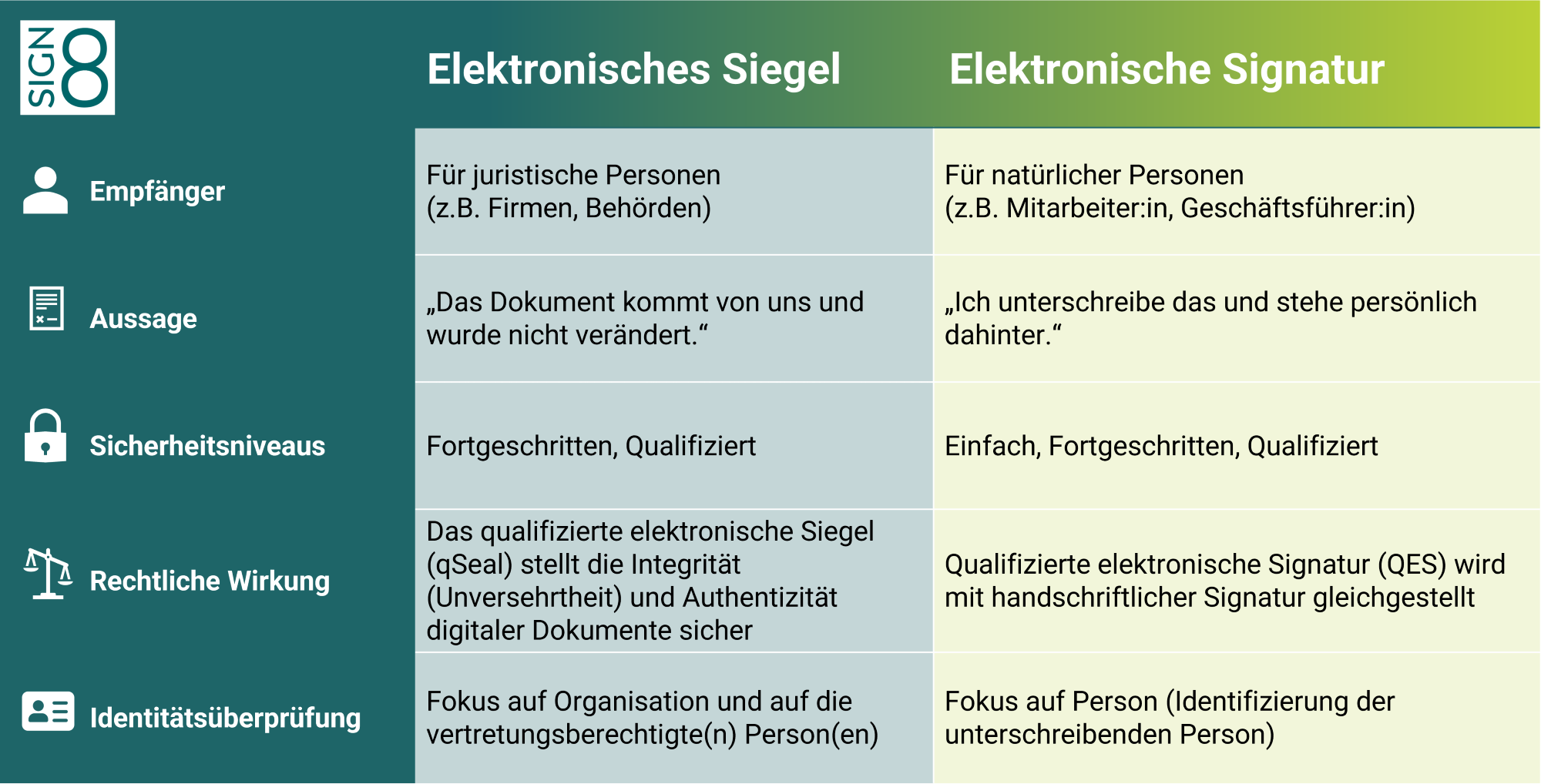
The table below gives you an overview of the key differences between electronic seals and electronic signatures.
Advantages of the electronic seal

Faster processes
Documents can be sent directly from the system without the need for a manual signature.

Greater traceability
The seal is verifiable and supports audits, as its origin and integrity can be transparently verified.

High scalability
Even large volumes of parcels can be handled reliably without a corresponding increase in staffing costs.

Consistent output
Every document is stamped in accordance with the same standard – regardless of the individual, team or location.

Our electronic seal solutions:
Signing portal
In our signing portal, you can sign documents electronically directly in the cloud. All you need is a device with a web browser; there’s no need to download any software.
signing APIs
With our signing APIs, you can integrate electronic seals directly into your applications and processes. This allows you to seal documents automatically – ideal for recurring document types and bulk documents.
signing token
Trust Center Infrastructure
The Trust Centre infrastructure is suitable if you have particularly high seal volumes or if there are specific security requirements, as the seal certificates are hosted directly within your own server environment.
Use cases for the electronic seal
An electronic seal is suitable for documents that you issue officially as an organisation. It uniquely identifies the sender and can be easily verified by recipients – whether internally, with customers and partners, or on portals and in government processes.
Official documents and certificates
Certificates of attendance and other certificates
Confirmations (e.g. membership, status, deadlines, receipt)
Examination and results records
Certificates, notices, decisions (depending on the process)
Documents for third parties: banks, insurance companies, partners
Product, compliance and register documentation
Declarations of conformity and manufacturer’s declarations
Technical data sheets and product documentation
Test reports and audit certificates
Documents for notification and registration processes (e.g. portals/registers)
Approvals and internal compliance documentation
Financial & Corporate Documents
Invoices, credit notes, reminders
Order confirmations and delivery notes
Terms and conditions, guidelines, information letters
Reports, account and settlement documents (as issuer)
Portal processes & bulk documents
Portal downloads: confirmations, notifications, certificates
Form letters and bulk outputs (e.g. thousands of PDFs)
Documents from specialist processes (e.g. administration, HR, service)
API-based document generation with direct sealing
Batch processing for recurring document types
How to apply for your seal
If you need a seal (e.g. for the EPREL database), you must first apply for one. Below, we provide an overview of all the necessary steps. You can find detailed step-by-step instructions in our Help Centre.

Do you need a seal for EPREL?
You’re in the right place!
To sell electrical products in the EU, you must first register with the EPREL database. Once you have successfully registered, you must verify your business using a qualified electronic seal (qSeal). During this process, a PDF file is generated which must be downloaded, sealed (or, in the case of sole traders, signed) and uploaded again.
As a qualified trust service provider, we are authorised to issue the required qSeal. The process for applying for the seal is exactly as described above. Once we have issued your seal, you should apply it to the EPREL declaration and then upload the qualified sealed PDF back to EPREL. To ensure you don’t miss anything, we have provided step-by-step instructions for EPREL sealing in our Help Centre. You will also find a YouTube video there that walks you through the entire process.
FAQ on the electronic seal
What is an electronic seal?
You can think of the electronic seal as a digital company stamp. It is the equivalent of a physical company stamp. The electronic seal confirms the origin and integrity of a document. In other words, it certifies that this document originates from this organisation and has not been tampered with.
What is the difference between an electronic seal and an electronic signature?
A signature belongs to a natural person. A seal belongs to an organisation (e.g. a limited liability company, a public authority, an association) and confirms the origin and integrity of a document.
What does qSeal (qualified electronic seal) mean?
A qualified electronic seal is the highest level of seal under eIDAS. It is based on a qualified certificate and meets particularly stringent requirements.
What is an electronic seal actually used for in practice?
Typical use cases include notices, certificates, invoices, supporting documents, attestations, data sheets, and documents for portals or registrations (e.g. EU reporting processes).
Is an electronic seal legally recognised?
Yes. Electronic seals are regulated in the EU by eIDAS. Qualified seals carry particularly strong evidential weight because they meet strict requirements.